How to configure Oracle Managed Files (OMF) in Oracle Database 26ai (CDB/PDB)
Introduction
Oracle Managed Files (OMF) is an Oracle Database feature that automates the creation, naming, placement, and deletion of database files, removing the need for DBAs to manage operating system file paths manually.
in this demo, we will go through steps to configure Oracle Managed Files (OMF) in Oracle Database 26ai (CDB/PDB)
Oracle Version: Oracle AI Database 26ai Free — Release 23.26.0.0.
Oracle Managed Files (OMF) simplifies file management by allowing Oracle to automatically create and manage:
- Datafiles
- Tempfiles
- Redo log files
- Control files
- FRA files
In Oracle 26ai, which is fully multitenant, OMF behaves differently depending on where it is configured:
- CDB$ROOT → settings apply to all PDBs (recommended)
- Individual PDB → can override root settings
Architecture (diagram)
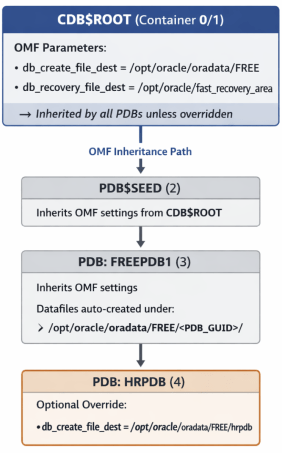
Enabling OMF at the CDB root ensures consistent file management across all existing and future PDBs.
| Parameter | Purpose |
| db_create_file_dest | Default location for datafiles & tempfiles |
| db_recovery_file_dest | Fast Recovery Area (FRA) |
| db_create_online_log_dest_n | Redo log destinations |
✅ Inheritance Rules
- CDB$ROOT settings propagate to all PDBs
- A PDB may override OMF by setting its own db_create_file_dest2
- Default Tablespace Location in Oracle 26ai
✅ When OMF is enabled
Oracle automatically chooses:
- Directory
- File name
- File numbering
- File extension
CDB root location:
$ORACLE_BASE/oradata/<CDB_NAME>/<unique_id>/
PDB location:
$ORACLE_BASE/oradata/<CDB_NAME>/<PDB_GUID>/
No DATAFILE clause is required.
✅ When OMF is NOT enabled
You must specify a datafile path:mypdb
CREATE TABLESPACE sales_tbs DATAFILE ‘/opt/oracle/oradata/FREE/sales01.dbf’ SIZE 1G;
If omitted, Oracle raises an error because no default directory exists.
✅How to Check if OMF Is Enabled
SHOW PARAMETER db_create_file_dest;
SHOW PARAMETER db_recovery_file_dest;
If values are returned → OMF is active.
[oracle@ol9-26ai ~]$ sqlplus / as sysdba

SQL*Plus: Release 23.26.1.0.0 - Production on Sun May 10 23:05:13 2026
Version 23.26.1.0.0

Copyright (c) 1982, 2025, Oracle. All rights reserved.

Connected to:
Oracle AI Database 26ai Free Release 23.26.1.0.0 - Develop, Learn, and Run for Free
Version 23.26.1.0.0

SQL> SHOW PARAMETER db_create_file_dest;

NAME TYPE VALUE
------------------------------------ ----------- ------------------------------
db_create_file_dest string
SQL>
SQL> SHOW PARAMETER db_recovery_file_dest;

NAME TYPE VALUE
------------------------------------ ----------- ------------------------------
db_recovery_file_dest string
db_recovery_file_dest_size big integer 0
SQL>
SQL>
This means OMF is NOT enabled by default in Oracle 26ai Free.
✅Viewing Where Oracle Creates Files
Datafiles for the entire CDB
SQL> SELECT name FROM v$datafile;

NAME
--------------------------------------------------------------------------------
/opt/oracle/oradata/FREE/system01.dbf
/opt/oracle/oradata/FREE/pdbseed/system01.dbf
/opt/oracle/oradata/FREE/sysaux01.dbf
/opt/oracle/oradata/FREE/pdbseed/sysaux01.dbf
/opt/oracle/oradata/FREE/users01.dbf
/opt/oracle/oradata/FREE/pdbseed/undotbs01.dbf
/opt/oracle/oradata/FREE/undotbs01.dbf
/opt/oracle/oradata/FREE/FREEPDB1/system01.dbf
/opt/oracle/oradata/FREE/FREEPDB1/sysaux01.dbf
/opt/oracle/oradata/FREE/FREEPDB1/undotbs01.dbf
/opt/oracle/oradata/FREE/FREEPDB1/users01.dbf

11 rows selected.

SQL>
✅Datafiles by container
SELECT con_id, name FROM v$datafile ORDER BY con_id;
SQL> set pagesize 0
SQL> set linesize 2000
SQL> column con_id format 99
SQL> column name format a100 SQL> SQL>
SELECT con_id, name FROM v$datafile
ORDER BY con_id;
1 /opt/oracle/oradata/FREE/undotbs01.dbf
1 /opt/oracle/oradata/FREE/users01.dbf
1 /opt/oracle/oradata/FREE/sysaux01.dbf
1 /opt/oracle/oradata/FREE/system01.dbf
2 /opt/oracle/oradata/FREE/pdbseed/sysaux01.dbf
2 /opt/oracle/oradata/FREE/pdbseed/system01.dbf
2 /opt/oracle/oradata/FREE/pdbseed/undotbs01.dbf
3 /opt/oracle/oradata/FREE/FREEPDB1/system01.dbf
3 /opt/oracle/oradata/FREE/FREEPDB1/sysaux01.dbf
3 /opt/oracle/oradata/FREE/FREEPDB1/undotbs01.dbf
3 /opt/oracle/oradata/FREE/FREEPDB1/users01.dbf
11 rows selected.
SQL>
This shows file locations for:
- CDB$ROOT (CON_ID = 1)
- PDB$SEED (CON_ID = 2)
- User PDBs (CON_ID ≥ 3)
✅ Enabling OMF at the CDB Level (Recommended)
This ensures all PDBs inherit OMF.
ALTER SESSION SET CONTAINER = CDB$ROOT;
ALTER SYSTEM SET db_create_file_dest = '/opt/oracle/oradata/FREE' SCOPE=BOTH;
ALTER SYSTEM SET db_recovery_file_dest_size =5G SCOPE=BOTH;
ALTER SYSTEM SET db_recovery_file_dest = '/opt/oracle/fast_recovery_area' SCOPE=BOTH;
If you are getting the follwing error,it’s because 🔥 1. The FRA directory does NOT exist
SQL> ALTER SESSION SET CONTAINER = CDB$ROOT;

Session altered.
SQL> ALTER SYSTEM SET db_create_file_dest = '/opt/oracle/oradata/FREE' SCOPE=BOTH;

System altered.
SQL> ALTER SYSTEM SET db_recovery_file_dest_size =5G SCOPE=BOTH;

System altered.
SQL> ALTER SYSTEM SET db_recovery_file_dest = '/opt/oracle/fast_recovery_area' SCOPE=BOTH;
ALTER SYSTEM SET db_recovery_file_dest = '/opt/oracle/fast_recovery_area' SCOPE=BOTH * ERROR at line 1: ORA-02097: parameter cannot be modified because specified value is invalid ORA-01261: Parameter db_recovery_file_dest destination string cannot be translated ORA-01262: Stat failed on a file destination directory Linux-x86_64 Error: 2: No such file or directory Help: https://docs.oracle.com/error-help/db/ora-02097/

SQL>
To fix the issue, we need to create the required directories
✅ Create the FRA directory on Linux
mkdir -p /opt/oracle/fast_recovery_area
chown oracle:oinstall /opt/oracle/fast_recovery_area
chmod 775 /opt/oracle/fast_recovery_area
✅ Set the FRA inside a PDB (not allowed). FRA must be set in CDB$ROOT, never inside a PDB.
LTER SESSION SET CONTAINER=CDB$ROOT;

ALTER SYSTEM SET db_recovery_file_dest_size=5G SCOPE=BOTH;
ALTER SYSTEM SET db_recovery_file_dest='/opt/oracle/fast_recovery_area' SCOPE=BOTH;

SQL> ALTER SESSION SET CONTAINER=CDB$ROOT;

Session altered.

SQL> ALTER SYSTEM SET db_recovery_file_dest_size=5G SCOPE=BOTH;

System altered.

SQL> ALTER SYSTEM SET db_recovery_file_dest='/opt/oracle/fast_recovery_area' SCOPE=BOTH;

System altered.

SQL>
✅ Effects
- All PDBs automatically use OMF
- BIGFILE tablespaces can be created without DATAFILE
- New PDBs require no FILE_NAME_CONVERT
- Storage becomes standardized across the CDB
✅ Verifying OMF Inheritance Across PDBs
Run from CDB root:
SELECT con_id, name, value
FROM v$parameter
WHERE name = 'db_create_file_dest'
ORDER BY con_id;

SQL>
SQL> ALTER SESSION SET CONTAINER=CDB$ROOT;

Session altered.

SQL> set pagesize 0
SQL> set linesize 2000
SQL> column con_id format 99
SQL> column name format a50
SQL> column value format a150
SQL>
SQL> SELECT con_id, name, value
FROM v$parameter
WHERE name = 'db_create_file_dest'
ORDER BY con_id;
1 db_create_file_dest /opt/oracle/oradata/FREE

SQL>
We get the following result::
- CON_ID = 1 → shows OMF path (
/opt/oracle/oradata/FREE) - All PDBs → inherit same path unless overriddenIf a PDB shows NULL → it is overriding the setting.
✅ Enabling OMF Inside a Specific PDB (Optional Override)
Use only when a PDB needs its own storage location.
ALTER SESSION SET CONTAINER = FREEPDB1;

ALTER SYSTEM SET db_create_file_dest ='/opt/oracle/oradata/FREE/FREEPDB1' SCOPE=BOTH;
This affects only that PDB.
✅ Creating Tablespaces with OMF
BIGFILE Tablespace (OMF enabled) : No DATAFILE clause needed.
SQL> ALTER SESSION SET CONTAINER=FREEPDB1;

Session altered.

SQL> ALTER SYSTEM SET db_create_file_dest = '/opt/oracle/oradata/FREEPDB1' SCOPE=BOTH;

System altered.

SQL> CREATE TABLESPACE test3_tbs;

Tablespace created.

SQL>
SQL> CREATE BIGFILE TABLESPACE test3_big_tbs;

Tablespace created.

SQL>
SQL> CREATE BIGFILE TABLESPACE test_big_tbs
DATAFILE SIZE 1G
AUTOEXTEND ON NEXT 100M MAXSIZE 5G;

Tablespace created.
SQL> SELECT FILE_NAME FROM DBA_DATA_FILES
2 WHERE TABLESPACE_NAME='TEST3_BIG_TBS';
/opt/oracle/oradata/FREEPDB1/FREE/4FAD624CCDB04751E063425A1FAC6D95/datafile/o1_mf_test3_bi_o02q3m49_.dbf

SQL>
BIGFILE Tablespace (OMF disabled): DATAFILE clause is mandatory:
CREATE BIGFILE TABLESPACE test0_tbs
DATAFILE '/opt/oracle/oradata/FREE/sales01.dbf'
SIZE 1G;
✅ Creating a PDB Using OMF
With OMF enabled at the root:
CREATE PLUGGABLE DATABASE hrpdb
ADMIN USER hradmin IDENTIFIED BY "PSxXXxxxx123";
Oracle automatically creates:
- Datafile
- Tempfiles
- Directory structure
- File names
No FILE_NAME_CONVERT needed.
SQL> alter session set container=testpdb;

Session altered.

SQL>
SQL>
SQL> create bigfile tablespace test_big_testpdb;

Tablespace created.

SQL> SELECT con_id, name FROM v$pdbs;
4 TESTPDB

SQL> SELECT file_name, tablespace_name
FROM cdb_data_files
WHERE con_id = 4;
/opt/oracle/oradata/FREE/FREE/51848617EAAF2609E063F65315AC8260/datafile/o1_mf_system_o02r5rvj_.dbf SYSTEM
/opt/oracle/oradata/FREE/FREE/51848617EAAF2609E063F65315AC8260/datafile/o1_mf_sysaux_o02r5rvq_.dbf SYSAUX
/opt/oracle/oradata/FREE/FREE/51848617EAAF2609E063F65315AC8260/datafile/o1_mf_undotbs1_o02r5rvq_.dbf UNDOTBS1
/opt/oracle/oradata/FREE/FREE/51848617EAAF2609E063F65315AC8260/datafile/o1_mf_test_big_o02rw1rw_.dbf TEST_BIG_TESTPDB

SQL>
✅ Preventing PDBs from Overriding OMF (Strict Mode)
ALTER SYSTEM SET db_create_file_dest =  '/opt/oracle/oradata/FREE'
SCOPE=SPFILE CONTAINER=ALL;
This enforces OMF globally.
✅ Disabling OMF
ALTER SYSTEM RESET db_create_file_dest SCOPE=BOTH;
ALTER SYSTEM RESET db_recovery_file_dest SCOPE=BOTH;
✅ Summary Table
| Task | Configure In | Effect |
| Enable OMF for all PDBs | CDB$ROOT | All PDBs inherit OMF |
| Create BIGFILE without DATAFILE | Any PDB | Works when OMF enabled |
| Create PDB without file paths | CDB$ROOT | OMF handles all files |
| Override OMF for one PDB | Inside that PDB | Local file location |
| Disable OMF | CDB root or PDB | Requires manual file paths |
✅ Final Notes for Oracle 26ai Free
- OMF is NOT enabled by default
- Default tablespace location is:
- /opt/oracle/oradata/FREE
- Enabling OMF is highly recommended for:
- Automation
- Clean directory structure
- Easier PDB creation
- Reduced human error
✅ This end the demo
Next‑Gen Ingestion Pipelines: Oracle Database 26ai to Kafka (Kraft mode) How to verify if DDS (Deep data Security) is enabled in Oracle database 26 ai
About Me

Senior oracle DBA/Developer | OCI Certified | OCP | OCE Sql Certified Expert

